
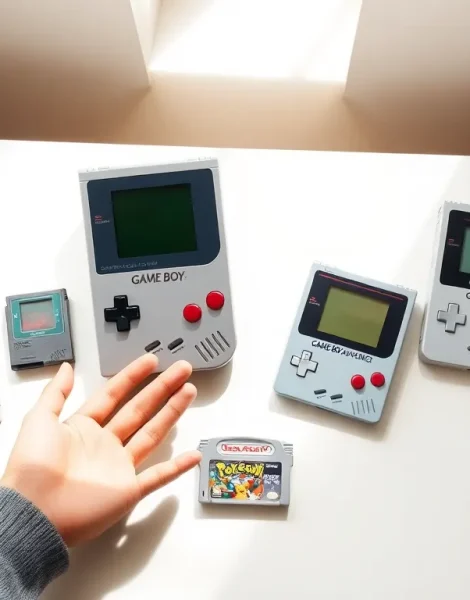
The Game Boy for beginners can feel overwhelming at first glance. Nintendo released multiple handheld models between 1989 and 2005, each with different features, screen types, and game compatibility. New collectors often struggle to pick the right model or find reliable games.
This guide breaks down everything a first-time buyer needs to know. It covers the Game Boy family tree, helps readers choose their first handheld, lists essential accessories, and recommends beginner-friendly games. Whether someone wants to relive childhood memories or experience retro gaming for the first time, this article provides a clear starting point.
Table of Contents
ToggleKey Takeaways
- The Game Boy for beginners starts with choosing the right model based on game library preference, budget, and screen quality.
- The Game Boy Advance SP AGS-001 offers the best balance of visibility, game compatibility, and price for most newcomers.
- Essential accessories like a carrying case, link cable, and screen protector protect your investment and enhance gameplay.
- Classic starter games like Tetris, Pokémon Red/Blue, and The Legend of Zelda: Link’s Awakening showcase the best of Game Boy gaming.
- Always inspect screen condition, button responsiveness, and battery compartment for corrosion before purchasing a used Game Boy.
- Clean cartridge contacts with 90%+ isopropyl alcohol and store units away from sunlight to keep your Game Boy running for years.
Understanding the Game Boy Family
Nintendo released several Game Boy models over 16 years. Each version improved on the last, though all share the same basic DNA.
The original Game Boy launched in 1989. It featured a green-tinted monochrome screen and ran on four AA batteries. Even though its simple graphics, this handheld dominated the market and sold over 118 million units worldwide.
The Game Boy Pocket arrived in 1996. It offered a slimmer design and sharper screen while using only two AAA batteries. Many collectors consider it the best-looking classic model.
Game Boy Color hit stores in 1998. This version added, you guessed it, color graphics. It played all original Game Boy games plus new color-exclusive titles.
The Game Boy Advance (GBA) launched in 2001. It marked a major leap forward with 32-bit graphics and a horizontal design. The GBA could also play older Game Boy and Game Boy Color games.
Game Boy Advance SP followed in 2003. Nintendo added a rechargeable battery and front-lit (later backlit) screen. This model remains popular among collectors for its excellent visibility.
Finally, the Game Boy Micro released in 2005. It was tiny and stylish but only played GBA games. Nintendo discontinued the Game Boy line shortly after.
For beginners interested in the Game Boy, understanding these differences helps narrow down which model fits their needs best.
Choosing Your First Game Boy Model
Picking a first Game Boy depends on three factors: game library preference, budget, and screen quality.
Game Library Preference
Players who want classic titles like Tetris, Pokémon Red/Blue, or Link’s Awakening should consider the Game Boy Color. It plays the entire original Game Boy catalog plus color-enhanced games.
Those interested in later titles like Pokémon Emerald, Metroid Fusion, or Mario Kart: Super Circuit need a Game Boy Advance model. The GBA library includes some of Nintendo’s best portable games.
Budget Considerations
Prices vary widely. Original Game Boys often sell for $40-$60 in good condition. Game Boy Colors typically cost $50-$80. The Game Boy Advance SP commands higher prices, usually $80-$150 depending on screen type.
Beginners on a tight budget might start with a standard GBA. These handhelds cost $50-$70 and play three generations of games. The main downside? No backlight makes playing in dim conditions difficult.
Screen Quality
Screen visibility matters more than most newcomers expect. The original Game Boy and standard GBA require external light sources. Playing in bed or on a plane becomes frustrating.
The Game Boy Advance SP AGS-101 model features a bright backlit screen. It offers the best viewing experience of any official Game Boy. But, AGS-101 units cost more than other models.
For most Game Boy beginners, the GBA SP AGS-001 (frontlit) offers a solid balance. It provides decent visibility, plays nearly every Game Boy game, and costs less than backlit models.
Essential Accessories You Need
A few key accessories improve the Game Boy experience significantly.
Carrying Case: Retro handhelds scratch easily. A padded case protects the screen and body during storage or travel. Many vintage cases remain available on eBay for under $15.
Link Cable: Multiplayer games like Pokémon require a link cable to trade and battle. Original Nintendo cables work best, though third-party options exist.
AC Adapter: For SP models, the original charger keeps the battery topped off. Generic chargers work but sometimes deliver inconsistent power.
Replacement Batteries: Standard Game Boy models use AA or AAA batteries. Rechargeable batteries save money over time. For SP models, replacement internal batteries restore units with dead cells.
Screen Protectors: Aftermarket screen protectors prevent scratches on the lens. They cost just a few dollars and save headaches later.
Headphones: The Game Boy’s speaker sounds tinny. A simple pair of headphones (with a 3.5mm adapter for SP models) dramatically improves audio quality.
Beginners exploring the Game Boy hobby don’t need everything at once. Start with a case and work up from there.
Best Starter Games for New Players
Certain games showcase what the Game Boy does best. These titles offer accessible gameplay and hold up remarkably well.
Tetris – The pack-in game that sold millions of Game Boys. Simple rules, addictive gameplay, and infinite replayability make it perfect for newcomers.
Super Mario Land 2: 6 Golden Coins – This platformer features tight controls and creative levels. It’s easier than other Mario games, making it ideal for beginners.
Pokémon Red/Blue/Yellow – These RPGs defined a generation. Catching and training creatures remains fun decades later. Yellow version adds Pikachu as a starter and follows the anime storyline.
The Legend of Zelda: Link’s Awakening – An adventure game with puzzles, combat, and exploration. The DX version on Game Boy Color adds a bonus dungeon and color graphics.
Kirby’s Dream Land – A short but charming platformer. Kirby can float, which makes difficult sections more forgiving.
For Game Boy Advance beginners, try these:
Pokémon FireRed/LeafGreen – Updated versions of the original games with modern features.
Mario & Luigi: Superstar Saga – A funny RPG with action-based combat. It’s accessible but has surprising depth.
Metroid Fusion – A sci-fi action game with exploration elements. The difficulty ramps up gradually.
These Game Boy games give beginners a strong foundation before diving deeper into the library.
Tips for Buying and Maintaining Your Game Boy
Smart shopping habits save money and prevent disappointment.
Where to Buy
Local game stores offer the safest option. Staff typically test units before selling them. Prices run higher than online marketplaces, but buyers can inspect items firsthand.
eBay provides the largest selection. Look for sellers with high feedback scores and detailed photos. Ask questions about screen condition and battery life before purchasing.
Facebook Marketplace and Craigslist offer local deals. Meeting in person allows testing before buying. Always meet in public places for safety.
Retro gaming conventions feature vendors with tested inventory. Prices vary, but haggling is often expected.
What to Check Before Buying
- Screen condition: Look for dead pixels, scratches, or screen burn.
- Button responsiveness: Test every button. Mushy or sticky inputs indicate wear.
- Battery compartment: Check for corrosion from leaked batteries. Minor corrosion can be cleaned: heavy damage ruins the unit.
- Sound output: Confirm the speaker works and headphone jack functions.
- Cartridge slot: Dirty pins cause games to fail. Cleaning helps, but damaged pins require repair.
Maintenance Basics
Clean cartridge contacts with isopropyl alcohol (90% or higher) and cotton swabs. This simple step fixes most “game won’t load” issues.
Store Game Boys away from direct sunlight. UV exposure yellows plastic over time.
Remove batteries during long storage periods. Leaked battery acid destroys electronics.
Keep the cartridge slot covered when not in use. Dust buildup causes connection problems.
Game Boy systems built in the 1990s still work today because of their simple, durable design. Basic care keeps them running for decades more.