
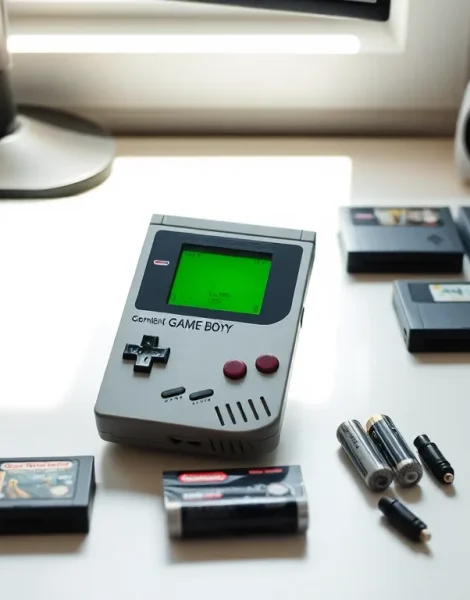
Learning how to Game Boy starts with understanding this iconic handheld console. Nintendo released the original Game Boy in 1989, and it quickly became one of the best-selling gaming devices of all time. Whether someone inherited a classic unit from a family member or picked one up at a retro gaming shop, this guide covers everything needed to get started. From hardware basics to maintenance tips, new users will find clear instructions for enjoying their Game Boy experience.
Table of Contents
ToggleKey Takeaways
- Learning how to Game Boy starts with inserting four AA batteries and a game cartridge before powering on the unit.
- Clean cartridge contacts with 90% isopropyl alcohol to fix common loading issues on your Game Boy.
- Always turn off the Game Boy before removing cartridges to prevent corrupted save data.
- The D-pad controls movement while A and B buttons handle actions—master these with beginner-friendly games like Tetris.
- Store your Game Boy in a cool, dry place and remove batteries during long-term storage to prevent corrosion damage.
- Game Boy cartridges with internal save batteries may need replacement after 15-20 years to preserve game progress.
Understanding the Game Boy Hardware
The Game Boy features a compact design that fits comfortably in both hands. The front panel displays the screen, directional pad (D-pad), and action buttons. On the right side, users will find the A and B buttons. The Start and Select buttons sit below the screen.
The top edge houses the cartridge slot and power switch. The left side contains the volume dial, while the bottom edge includes the headphone jack and external link cable port. The back panel holds the battery compartment, which requires four AA batteries.
Different Game Boy models exist, including the original “brick” model, Game Boy Pocket, Game Boy Color, and Game Boy Advance. Each version offers slight variations in size, screen quality, and compatibility. The original Game Boy uses a green-tinted monochrome display. Later models introduced color screens and improved backlighting.
Understanding these hardware components helps users troubleshoot issues and maximize their gaming sessions. The Game Boy was built to last, and many units from the 1990s still function perfectly today.
Setting Up Your Game Boy for the First Time
Setting up a Game Boy takes just a few minutes. First, flip the unit over and locate the battery compartment cover. Slide it off and insert four AA batteries, matching the positive and negative terminals to the markings inside.
Once the batteries are installed, replace the compartment cover. The Game Boy is now ready for power. Locate the power switch on the top edge of the unit. Before turning it on, make sure a game cartridge is inserted, the Game Boy won’t display anything useful without one.
Slide the power switch to the “ON” position. The Nintendo logo should scroll down the screen, followed by the game’s title screen. If the screen remains blank or shows garbled graphics, the cartridge may need cleaning. (More on that later.)
For extended play sessions, consider using a rechargeable battery pack or AC adapter. These accessories reduce long-term battery costs and keep the Game Boy powered during marathon gaming sessions. Original AC adapters are harder to find today, but third-party options work well with most models.
Inserting and Playing Game Cartridges
Game Boy cartridges store games on internal chips. Each cartridge slides into the slot on top of the unit. To insert a cartridge, hold it with the label facing the front of the Game Boy. Push it firmly into the slot until it clicks into place.
The Game Boy reads data from the cartridge’s metal contacts. These gold-colored pins must be clean for proper function. If a game doesn’t load correctly, remove the cartridge and inspect the contacts for dust or corrosion.
To remove a cartridge, always turn off the Game Boy first. Pulling out a cartridge during gameplay can corrupt save data. Once the power is off, grip the cartridge and pull it straight up. Store cartridges in protective cases to prevent dust buildup.
Some Game Boy games include internal batteries for saving progress. Games like Pokémon Red and The Legend of Zelda: Link’s Awakening use this feature. These batteries can die after 15-20 years, causing save files to disappear. Replacement batteries are available, though installation requires basic soldering skills.
The Game Boy library includes thousands of titles across multiple genres. Popular games include Tetris, Super Mario Land, and Kirby’s Dream Land. Collectors and casual players alike can find affordable cartridges at retro game stores and online marketplaces.
Mastering the Controls and Navigation
The Game Boy control scheme is simple but effective. The D-pad on the left side handles all directional movement. Press up, down, left, or right to move characters and navigate menus.
The A and B buttons perform most in-game actions. In platformers, A typically jumps while B runs or attacks. In RPGs, A confirms selections and B cancels them. Each game assigns these buttons differently, so players should check the instruction manual or experiment during gameplay.
Start and Select serve secondary functions. Start usually pauses the game or opens the main menu. Select often switches between options or accesses inventory screens. Some games don’t use the Select button at all.
New players should practice with simpler games before tackling difficult titles. Tetris offers a great introduction to Game Boy controls. The blocks respond instantly to D-pad inputs, and the A and B buttons rotate pieces. This quick feedback helps users build muscle memory.
For competitive play, the Game Boy supports link cable connections. Two players can connect their units and compete head-to-head in compatible games. Pokémon trading and Tetris battles became cultural phenomena thanks to this feature. The link cable port sits on the bottom edge of the unit.
Tips for Maintaining Your Game Boy
Proper maintenance keeps a Game Boy running for decades. The most common issue involves dirty cartridge contacts. Clean these using isopropyl alcohol (90% or higher) and a cotton swab. Dip the swab in alcohol, rub it across the contacts, and let them dry completely before playing.
The Game Boy screen can develop dead pixels or lines over time. Some issues result from loose ribbon cables inside the unit. Experienced users can open the case and reseat these cables. For valuable units, professional repair services offer safer solutions.
Store the Game Boy in a cool, dry place. Humidity causes corrosion on internal components. Remove batteries during long-term storage to prevent leakage. Battery acid damages circuit boards and can destroy a unit permanently.
Screen protectors help prevent scratches on the display lens. Replacement lenses are available for units with heavy wear. Installation requires removing the old lens and applying a new one with adhesive.
The Game Boy shell can yellow with age due to UV exposure. Some collectors use retrobright solutions to restore original colors. Others embrace the patina as part of the unit’s history.
Regular cleaning extends the lifespan of buttons and controls. Use compressed air to remove debris from around the D-pad and action buttons. A soft cloth dampened with water handles exterior grime.